
You tap Get on a free app, or your monthly subscription tries to renew, and the App Store says “Your payment method was declined”. Or it’s the other one: “There is a billing problem with a previous purchase”, and now nothing will download at all. Your iPhone is fine, and so is the app.
If your App Store payment failed in India, the cause is almost always one of a handful of local payment snags, not the phone. Each one has its own fix. Start with the first, because it blocks all the others.
App Store payment failed in India: the quick answer
Seeing that billing problem message, or “verification required”? An earlier charge didn’t go through, often a renewal your card declined. Until it’s paid, Apple can block new purchases, even free downloads, and subscriptions. Clear that first.
For everything else, switch to UPI. It’s on Apple’s list of payment methods for India, it covers one-off buys and subscriptions, and Apple’s fine print doesn’t bar it from Family Sharing the way it bars Indian cards. Indian cards fail for local reasons: online or international use switched off at the bank, a missed OTP, a name that doesn’t match the bank’s records, or a RuPay card, which isn’t on Apple’s list at all.
Renewal failed (iCloud+, Apple One, Apple Music)? Pay what you owe now: adding UPI covers that. The renewals after it stay on the old method, though. To move them to UPI Autopay you have to cancel, let the paid period run out and subscribe again (more on that below).
Pay off the unpaid order first
Apple won’t take a new payment while an old one is outstanding. That’s why a free app suddenly asks you to pay: the message isn’t about the app in front of you, it’s about something from last week or last month.
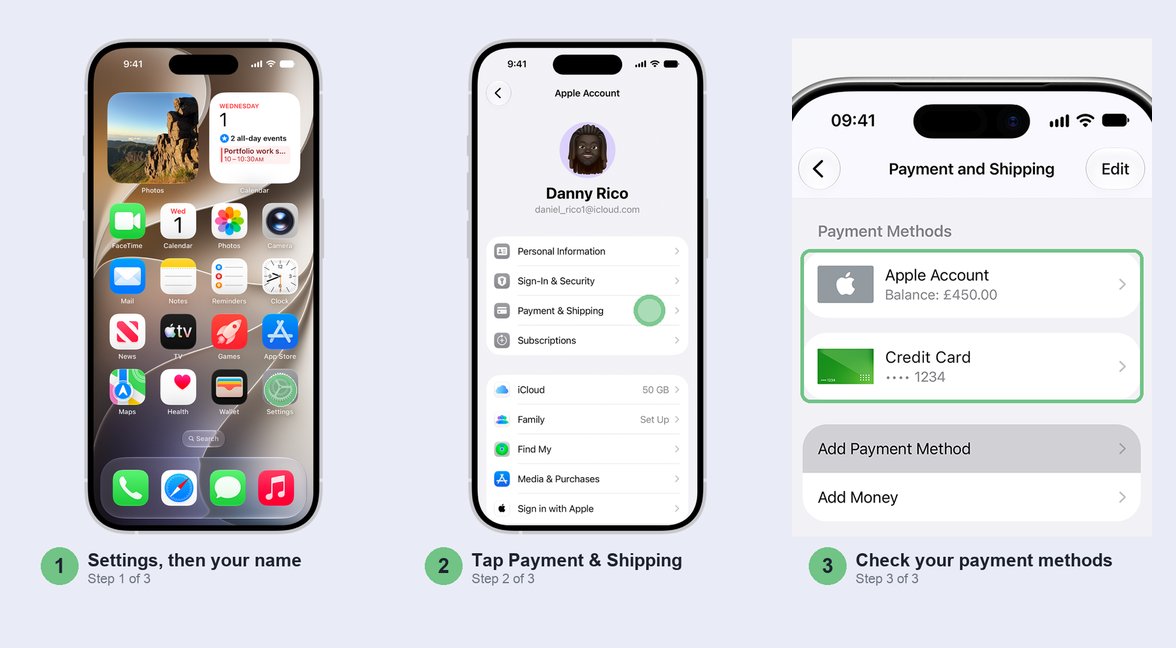
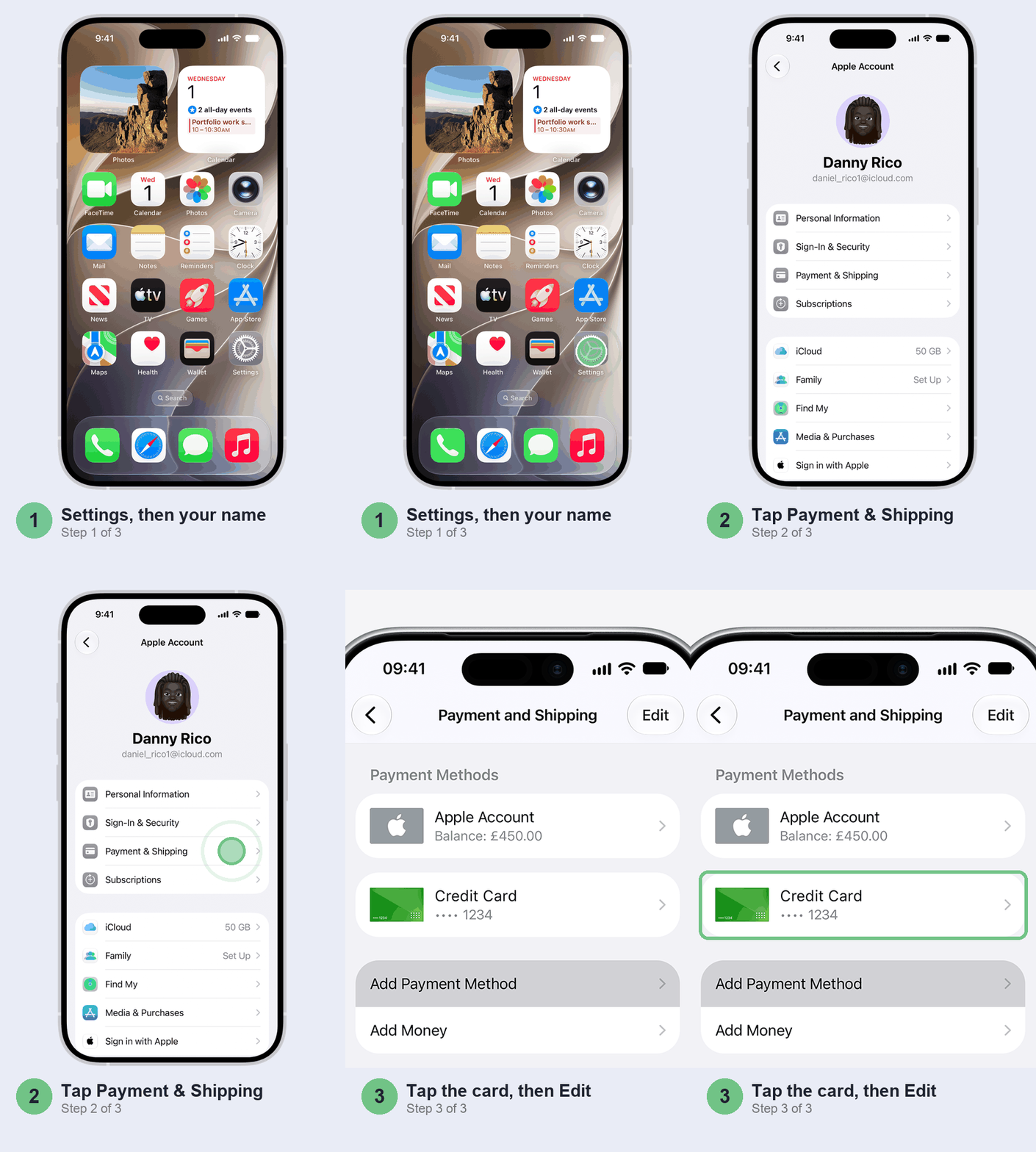
Open Settings > [your name] > Payment & Shipping. If a payment is due, you’ll see Update Payment Information. Tap it, then tap Try Again to have Apple charge the same method once more.
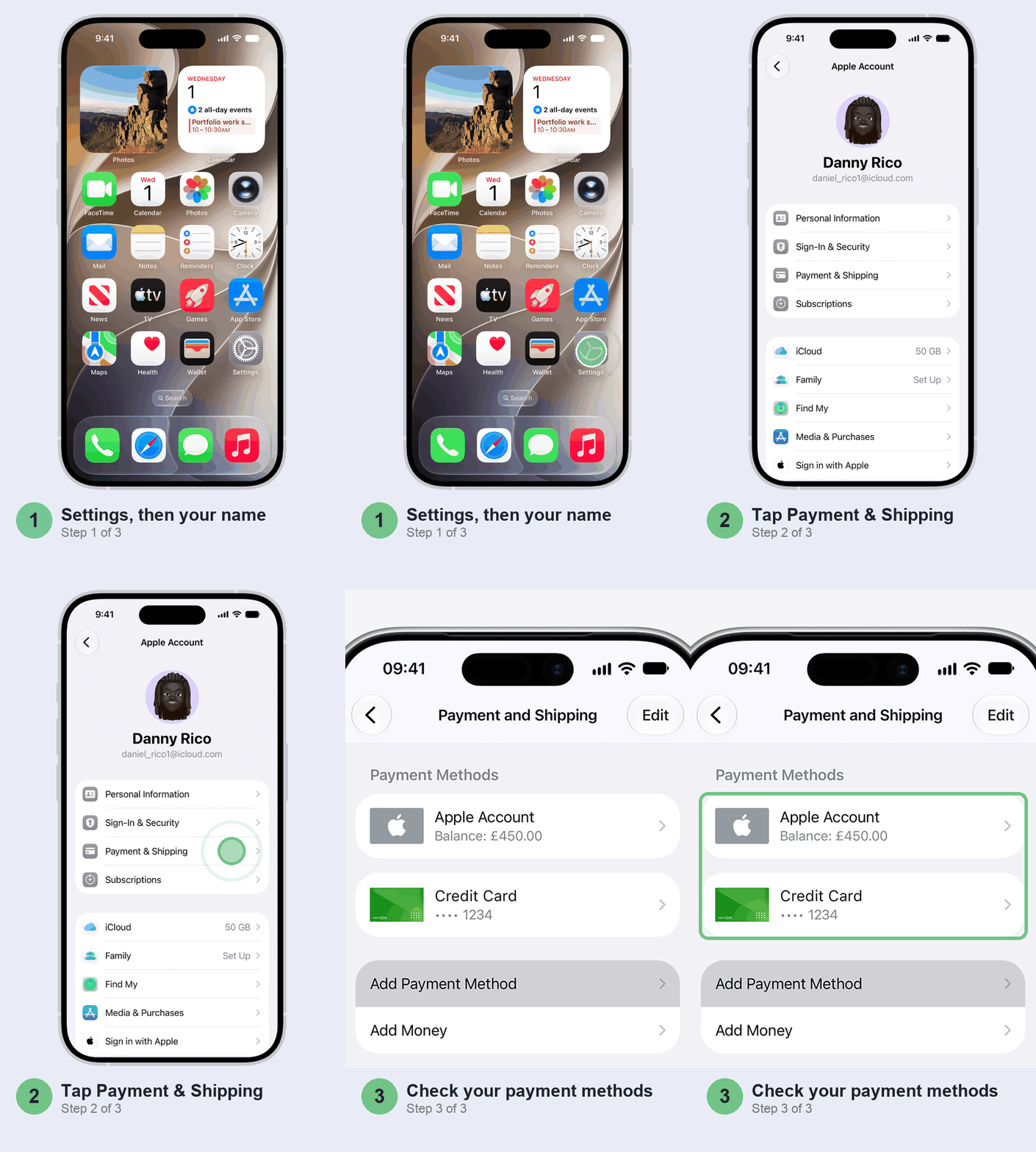
If that card fails again, don’t keep retrying: it won’t change the bank’s answer. Add UPI instead (next section) and remove the old card, and Apple charges the new method for the unpaid order on its own. If Apple won’t let you remove the card while the order is unpaid, leave it for now and pay the order from your balance instead (two sections down).
Switch to UPI and drop the card that keeps failing
This is the fix that usually sticks, and the one we’d try first. Apple’s India list has UPI, Visa, Mastercard, net banking (for top-ups only) and your Apple Account balance. RuPay isn’t there, so if your card is RuPay, UPI from the same bank account is the way round it.
UPI also dodges most of the card problems further down. There’s no online or international switch to find at the bank, and Apple’s fine print doesn’t bar it from Family Sharing the way it bars Indian cards.
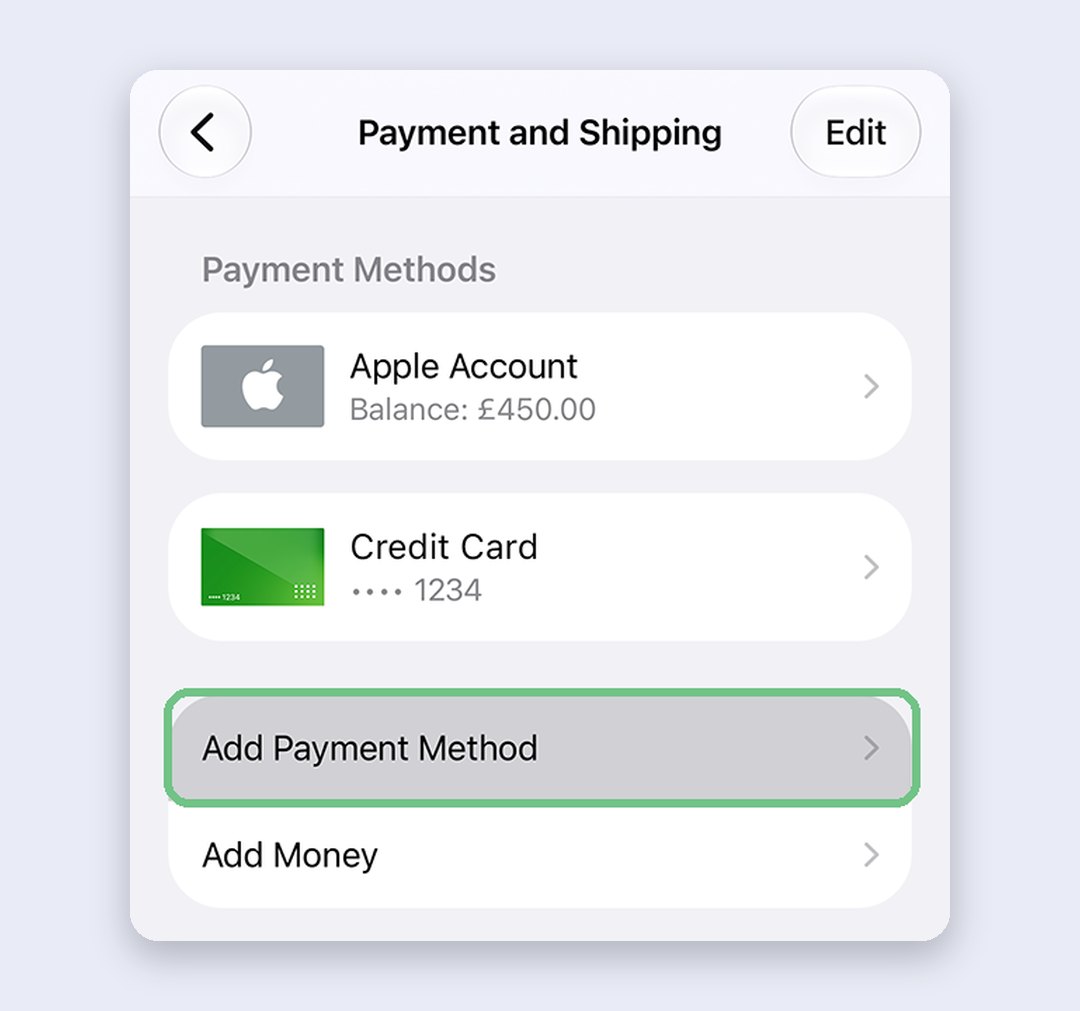
On the Payment & Shipping screen, tap Add Payment Method, choose UPI and follow the prompts. If a request turns up in your UPI app, approve it there. Keeping the card as a backup? Skip the removal and use Edit to drag UPI to the top, so Apple tries it first. Otherwise tap Edit, tap the red button beside the old card and confirm with Remove.
If UPI itself won’t set up on your phone, our guide to UPI apps not working on iPhone sorts that out first.
Top up your Apple Account balance instead
Prefer not to have Apple charge a card or a mandate for every purchase? Keep one valid method on file (UPI is fine), put money in your Apple Account and let purchases come out of that. You top up when you want to, and the balance pays for apps, in-app buys and new subscriptions.
Open the App Store and tap your photo or initials, then Add Money. Pick an amount and pay with UPI, net banking or a card. Net banking only works here, as a top-up; you can’t keep it on file for purchases. Your bank may ask for an OTP or an approval in its app before the money lands.
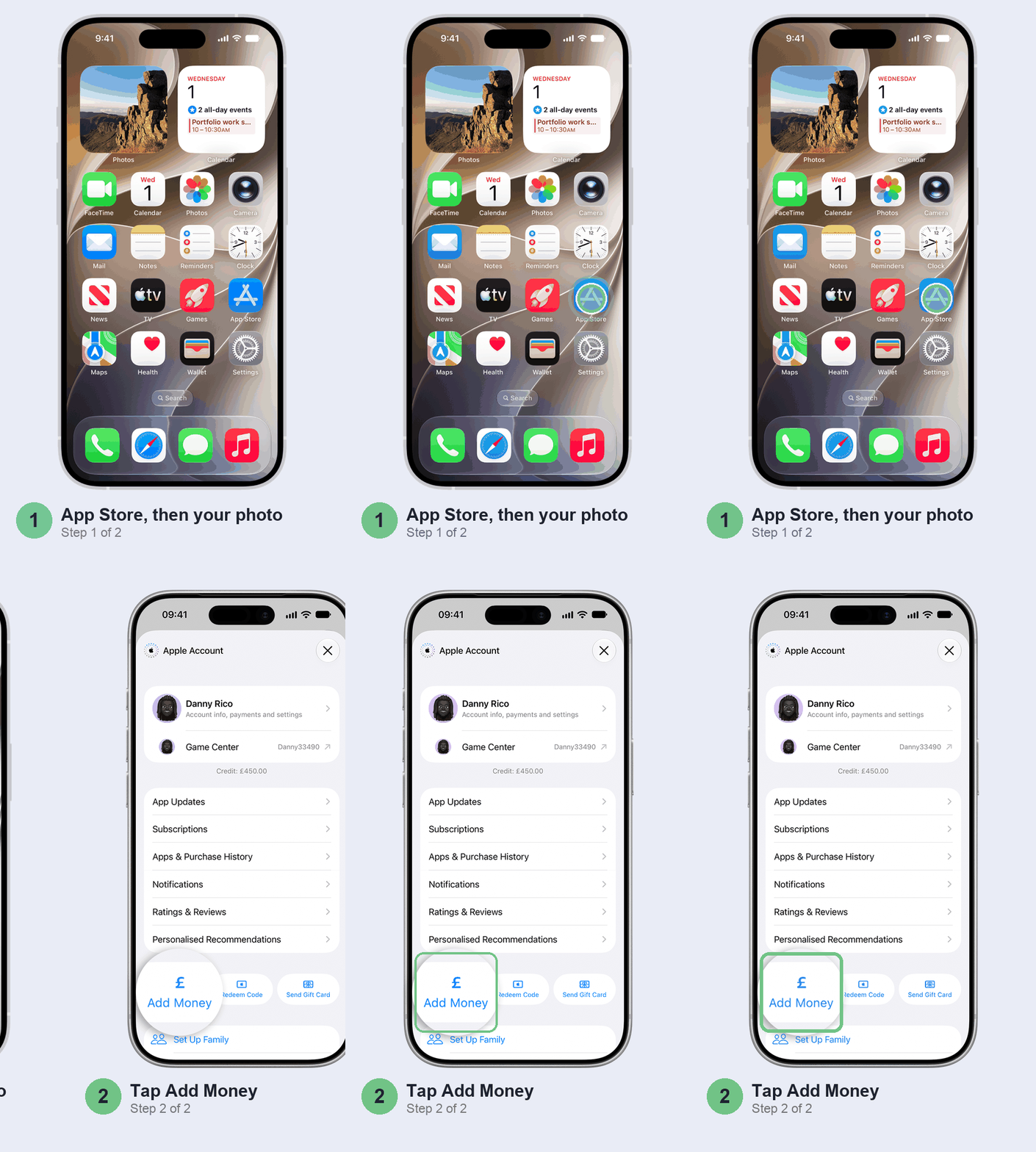
Got an App Store Card? Tap Redeem Code on the same screen, and the money goes to the same balance.
To spend the balance on an unpaid order, tap Apps & Purchase History on that screen, then Purchase History. Open the order marked Amount You Owe and tap Pay with Apple Account Credit. The catch: if the unpaid order is an AppleCare+ plan, your balance can’t pay it, and nor can a card. Apple’s India list leaves UPI.
Keeping the card? Turn on online and international use
If you’d rather stay on a card, the fix is almost always at your bank. Don’t bother asking Apple why it was declined: Apple isn’t told. Your bank is.
Start with the bank’s app. Under RBI rules from 2020, new and reissued Indian cards work only at ATMs and shop terminals in India until you switch on online and international use yourself. Cards that had never been used online were switched off too. Find the card controls in your bank’s app or net banking and turn on online (e-commerce) payments. Turn on international use as well, since Apple says your purchase may need it, and check the spending limit while you’re there.
Next, the OTP. Your bank may want to verify an Indian Visa or Mastercard card when you add it or buy something, so keep the phone with your bank’s number handy. If that OTP never arrives, it’s an SMS problem, and our guide to an iPhone not receiving OTP SMS covers it.
Last, the details. Apple wants the name and billing address on the card to match what your bank has, spelling included. Open Settings > [your name] > Payment & Shipping, tap the card, then Edit, and copy them exactly from your bank statement.
Subscription failed? Approve the UPI Autopay mandate
Subscriptions follow their own rules in India. Under RBI’s e-mandate framework, a recurring payment needs a standing instruction you approve once with an extra check from your bank, and the first charge needs that check too. After that, your bank has to warn you at least 24 hours before each charge, and renewals up to ₹15,000 can go through without another OTP; above that, each one needs it. The same rules cover card renewals, so a debit card that works fine for one-off online payments can still fail a renewal if the mandate wasn’t approved.
When you start a subscription on UPI Autopay, you may be asked to approve the recurring payment in your UPI app. Don’t ignore that request, or the subscription fails. If it still won’t go through, check three things: your bank supports UPI Autopay, the account has money on renewal day, and you didn’t skip the charge from the bank’s pre-debit alert, which lets you opt out of a single payment.
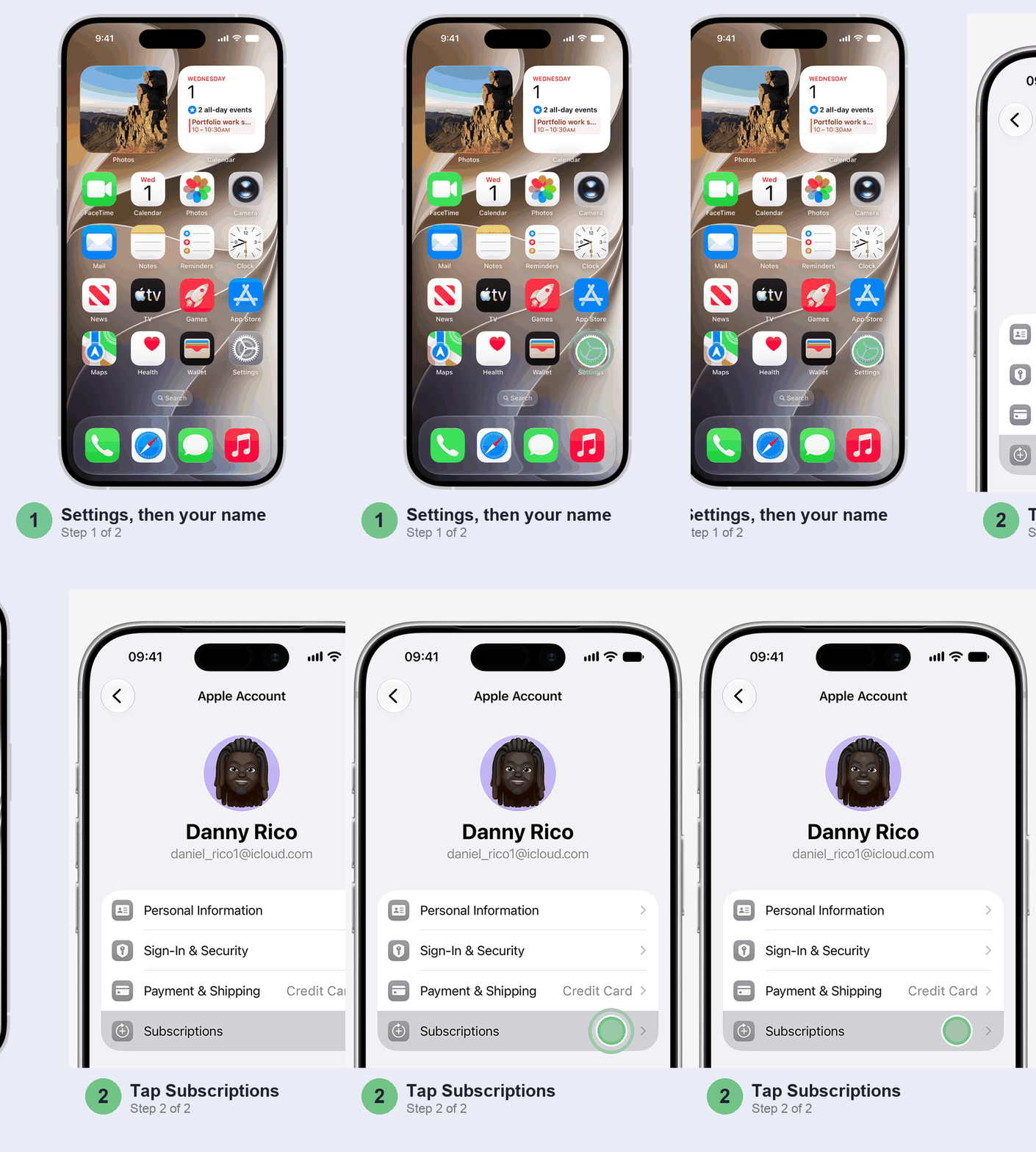
Want to move a subscription from a card to UPI Autopay, or the other way? You can’t swap it in place. Cancel it, let the period you’ve paid for run out, then subscribe again with the new method. Open Settings > [your name] > Subscriptions, tap the subscription and tap Cancel Subscription.
Family Sharing: put UPI on the organiser’s account
In a Family Sharing group with Purchase Sharing on, you may not be the one paying. Apple takes the money from your own Apple Account balance first, and anything left goes to the organiser’s shared payment method, unless you’ve added your own.
Here’s the catch for India. Apple’s list rules out Indian Visa and Mastercard cards, and net banking, for Family Sharing. So if the organiser only has a card on file, a family member’s purchase has nothing valid to bill. The organiser should open Settings > Family > Purchase Sharing and look under Payment Methods. UPI is the one method Apple’s India list doesn’t rule out, so add it there.
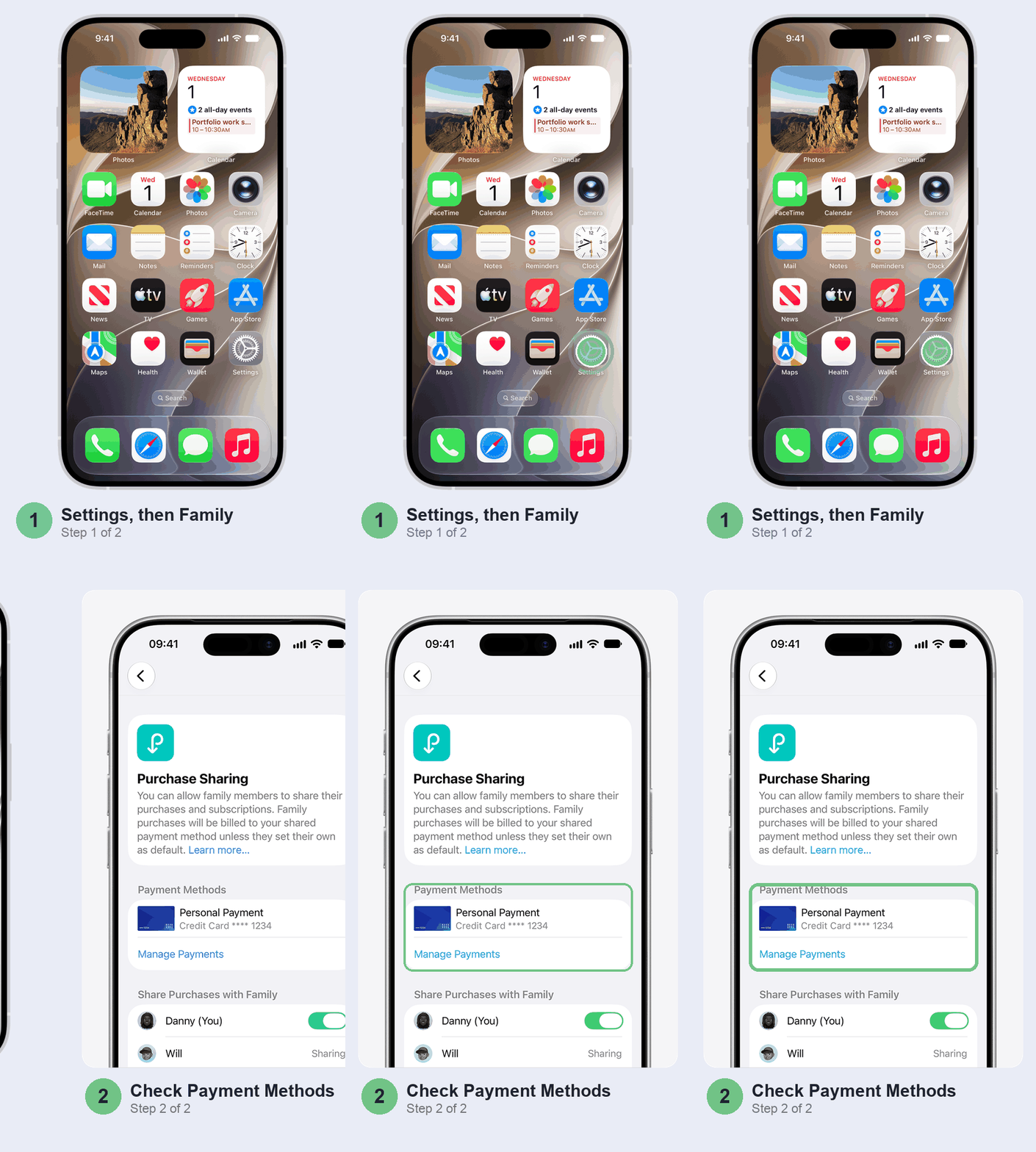
Not the organiser? If you’re an adult member, add your own UPI method or top up your own balance; otherwise ask the organiser to sort theirs out.
Don’t bother with these
- Retrying the same card. If the bank declined it, it’ll keep declining until the bank’s setting changes.
- Switching your Apple Account to another country. You’d have to spend your balance, cancel subscriptions and wait for them to end, possibly leave Family Sharing, and then find a payment method from that country.
- Removing every payment method to dodge the bill. Apple won’t let you while there’s an unpaid balance, a live subscription or Purchase Sharing you organise.
- Signing out and back in. The block sits on your Apple Account, not on the phone, so it follows you straight back.
When it’s not your iPhone
If the bank says the card is fine, your UPI Autopay is set up and the money’s there, and the App Store still refuses, it’s time to ask Apple. Contact Apple Support and mention the unpaid order or the subscription by name. Anything about why a payment was declined or a mandate failed is your bank’s to answer.
Money left your account but the App Store says the payment failed? Start with Purchase History, because it may have gone through. If it didn’t, RBI rules make your bank reverse a failed UPI or online card payment within five days of the payment, and pay you ₹100 for every day it runs late after that. Raise it with the bank if the money hasn’t come back.
Quick questions
Why does my App Store keep saying payment failed?
Usually an unpaid earlier order is blocking everything, or your bank won’t let Apple charge the card. Clear the unpaid order, then switch to UPI or turn on online and international use for the card.
How to get Apple to retry a failed payment?
In Payment & Shipping, tap Update Payment Information, then Try Again. Or add UPI as a new payment method: Apple charges it for the unpaid order on its own.
Is Apple Pay working now in India?
Yes, since 30 September 2026, with Axis Bank credit cards. It isn’t on Apple’s list of App Store payment methods for India as of October 2026, so for the App Store use UPI, a card or your balance.
What should I do if my Apple Pay payment failed?
Apple Pay in India works only with Axis Bank credit cards for now. Axis may ask for an OTP or an approval in its app when you add the card. If adding the card fails, or a payment is declined, call Axis: Apple can’t see why a bank said no.
Can I pay on the App Store with a RuPay card?
Not as of October 2026: RuPay isn’t on Apple’s list for India. UPI from the same bank account works instead.
Prefer to watch? Apple’s own video walks through the same payment screens (on an older version of iOS), including the bank check.
Which one was it for you: an unpaid order, a card your bank had switched off, or the Autopay request you never saw? Tell us in the comments with your bank, and we’ll add what works to this guide.
Last updated: October 2026